- Broadband
- Phone
- Hosting
- Security
- About

CloudLink Vision is our own CCTV surveillance system. See every camera live, find any moment in seconds and get alerted the moment something happens, from your phone, your computer or a web browser.
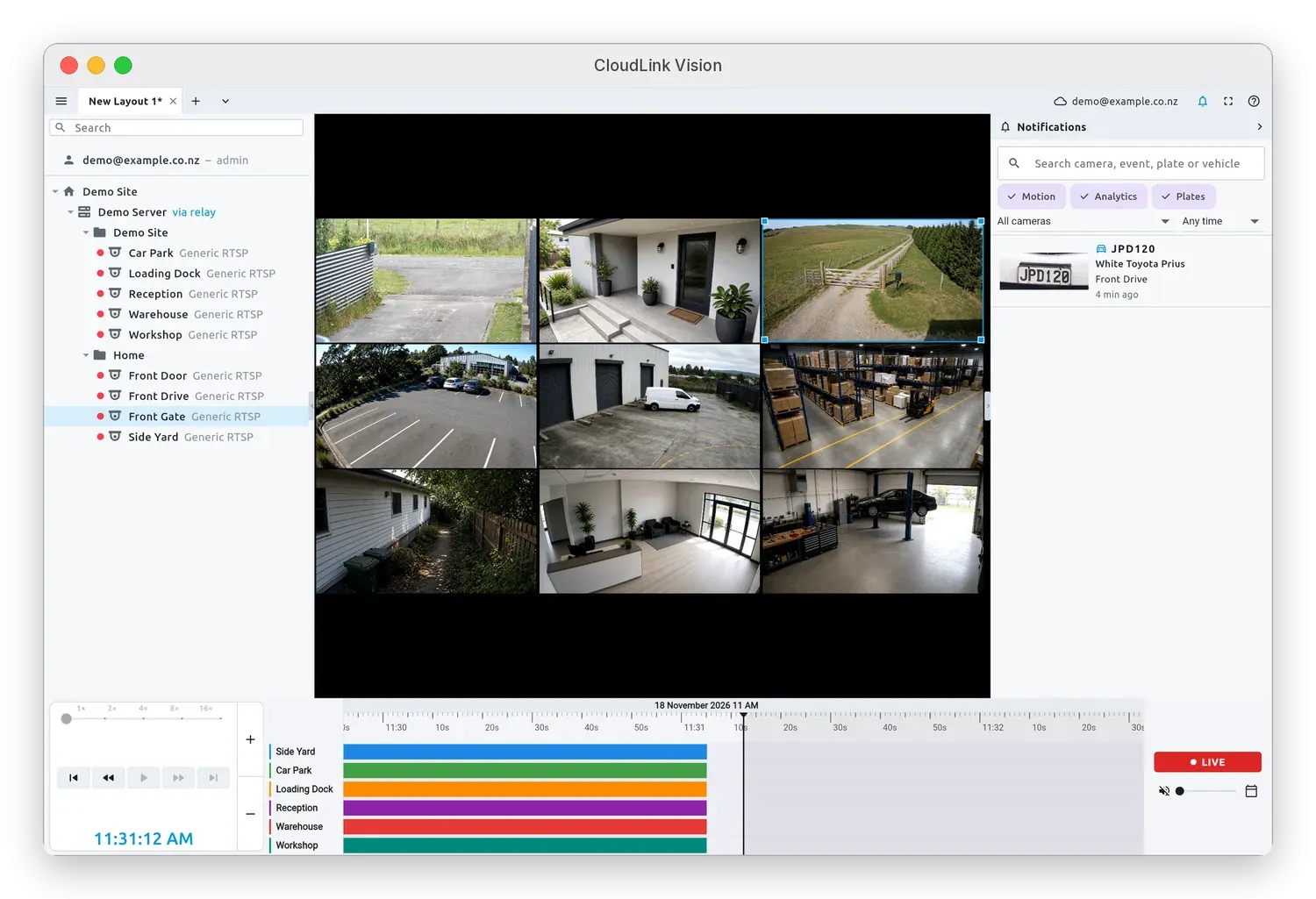
Sign in with the same account on any device and your cameras and saved layouts are right there.
Open vision.cloudlink.nz on any computer. Live view, playback, settings and exports are all there, with nothing to install.
The CloudLink Vision desktop app is made for Mac, Windows and Linux. Run it full screen on a spare monitor and keep an eye on every site.
The iPhone, iPad and Android apps give you live view, playback, clip export and push alerts. Away from home, they connect securely through CloudLink. On your own network, they connect straight to your server for the fastest picture.
On an iPad or other tablet you get the full multi-camera layout, the timeline and the notifications list, all within reach of your thumbs. Perfect for a reception desk or a workshop wall.
Same software, same apps, same features. Choose where your cameras record.
We host your recording in our New Zealand cloud, so there is nothing to buy, fit or look after on site.
A CloudLink NVR at your site records locally. You get fast access on your own network, with the same remote apps.
A complete surveillance system, without the complexity.
Windows, Mac and Linux apps for a dedicated monitoring screen.
The full system in any browser, with nothing to install.
Live view, playback, clip export and push alerts in your pocket.
A roomy multi-camera view on iPad and other tablets.
Arrange your cameras once. They follow your account to every device and stay in sync.
Scrub a colour-coded timeline, jump between motion events, play several cameras together.
Save any moment as an MP4 with the camera name and time stamped on it.
Server motion detection plus camera events over ONVIF, such as line crossing and intrusion.
Per camera, with a picture, by schedule, to the people you choose.
View from anywhere over an encrypted connection. No port forwarding or VPN.
ONVIF cameras such as Dahua, Hikvision and Provision, plus any generic RTSP stream.
With more than one server on a site, cameras move to another server if one goes offline, and back again.
Houses, shops and depots on one login, grouped by site.
Give each person their own login and only the cameras they need.
A record of who accessed what, and when.
Uses the server graphics card (NVIDIA or Intel) for fast, smooth video and smart features.
Switch to the lighter stream on a slow or mobile connection. Auto picks for you.
Keep footage for 30, 60 or 90 days, or size your own server to suit.
Listen live and in playback from cameras with a microphone.
Pan, tilt and zoom, with saved presets, from the app or the browser.
See uptime, CPU, memory and graphics-card load at a glance.
Your system keeps itself current with new features and security fixes.
Our cloud servers are in Palmerston North, run by CloudLink.
Trigger a webhook on motion, a plate or a face, for gates, alarms and automation.
Add number plate recognition or face recognition to the cameras that need it. Switch them on camera by camera, and get alerts by email and push notification.
When a vehicle passes, Vision reads the plate and saves a close-up, a picture of the vehicle and the time. With vehicle lookups on, it also shows the make, model and colour from the New Zealand vehicle register, so a black Outlander is easy to tell from a white Prius.
Know who is at the door. Name the people you know and Vision will tell you when they arrive. Anyone it doesn't recognise is shown as an unknown person, ready to be named later.
AlexFront DoorChoose email, push notification or both, for each camera and each kind of event. Pick who gets them, set the hours they apply, and limit how often they are sent.
Plate JPD120 was read on camera Front Drive.
Site: Demo Site
Server: Demo Server
Time: 18 November 2026, 11:31 am
White Toyota Prius · picture attached
Example email alert
Example push notifications. Wording can be customised per camera.
Cloud hosted CloudLink Vision is charged per camera per month. The longer you keep your footage, the more you store, so you only pay for what you need.
A CloudLink NVR at your site, sized to your cameras, storage and retention.
All prices in NZ dollars, including GST. Camera supply and installation are available and are priced on application.
Usually not. CloudLink Vision works with ONVIF cameras, including Dahua, Hikvision and Provision, and with any camera that offers an RTSP stream. If you need cameras, we can supply and install them.
No. The apps and web app connect through CloudLink over an encrypted connection, so you don't need to open anything on your router.
An on-premises server keeps recording to its own disks, and you can still view it on your local network. Remote access comes back when the internet does.
Cloud hosted footage is recorded on CloudLink servers in New Zealand. With an on-premises system, it stays on your own server at your site.
Cloud hosted plans keep 30, 60 or 90 days, depending on the plan you choose. On-premises, retention depends on the storage in your server, and we size it to the number of days you need.
Yes, you can run more than one site on the same login. Talk to us about the best set-up for each location.
They are switched on per camera by CloudLink or your administrator, and billed per camera. ANPR works best on cameras overlooking a driveway or entrance. Face recognition only runs on the cameras you choose, and the face pictures stay on your Vision server.
Only the people you give an account to. Each person signs in with their own login, and can be limited to particular cameras. You can remove anyone's access at any time.
Yes. Export any moment as an MP4 clip with the camera name and time on screen, and hand over the file.
Windows, Mac and Linux desktop apps, any modern web browser, and the CloudLink Vision apps for iPhone, iPad and Android.
Tell us about your site and we will recommend the right set-up, cloud hosted or on-premises.
Monday to Friday, 8:00am to 5:00pm